


Openstack
Openstack is a cloud virtualization platform used by many enterprises and could be what’s under the hood of a cloud provider. VMware has long been the defacto standard in the enterprise space for virtualization but recent changes to contracting have made it much less appealing to many businesses. There are other enterprise virtualization solutions like OpenShift and Nutanix. Openstack is quite complex but is still a viable candidate for an enterprise virtualization solution. Proxmox, KVM (Qemu / Virt-Manager), and VirtualBox are also popular virtualization choices, which all behave more similarly to VMware than a cloud platform. The cloud platform behavior is really what has drawn me to Openstack, I want to have my very own private cloud platform in my lab, and this is very easy to script against for common operations.
Manual Installation Process
As mentioned in a previous post there are several ways to install Openstack. The manual installation process is following the Openstack installation guide. Openstack is comprised of modular projects that handle different parts of the stack such as compute, networking, etc. This is however difficult to manage and update because updating one component can cause dependency issues. There are several ways to automate installation and management which are suitable for production style deployments.
My purpose in installing Openstack manually is to understand the platform. I have a deep curiosity around understanding underlying frameworks which, when it kicks in, won’t allow me to install new software without understanding how it works beneath the surface. Openstack is one of those platforms, and I have to say while this has been a very long and sometimes frustrating process the idea of trying to reverse engineer how it works after using an automated install process would be infinitely more frustrating. Openstack is one of the platforms that has tons configuration options which don’t need to be implemented exactly the same for a deployment to function. So, without the experience of installing manually, there would be the added difficulty of understanding if the root cause of particular issue was the Openstack platform or the automated installation method. Additionally the automated installation methods will be much easier to understand having the understanding of what the installation method configuration options mean for the final Openstack deployment.
Minimum Requirements
Openstack is designed for scale and while a manual installation could theoretically be configured on one node, it’s best to use a minimum of three, although the block storage node is technically optional it is recommended. There are several non-Openstack services that Openstack relies on like RabbitMQ and OpenVSwitch (OVS), but below is the distribution of Openstack services across the 3 nodes. I will be focusing on the Controller and Compute nodes in this post as that is the core of Openstack.
- Controller
- Identity service – Keystone
- Image service – Glance
- Placement service – API service
- Networking service – Neutron
- Compute Controller – Nova
- Block Store Controller – Cinder
- Dashboard – Horizon
- Compute
- Compute service – Nova
- Networking – Neutron
- Block Storage
- Block Storage service – Cinder
I handled this by creating 3 VMs on my host machine.
Physical Server - KVM Virtualization
    ├── Controller VM
    ├── Compute VM
    ├── Block Store VM
Quick Tips
I installed the Bobcat version which has since been dropped from support. There are some things gradually changing, but the vast majority of configurations and concepts will apply to newer versions of Openstack, and I definitely recommend starting on something newer like Dalmatian.
- OS
- Instructions are provided in the documentation for RHEL / Centos and Ubuntu
- I used CentOS9
- One of the reasons I used CentOS is because it’s a rolling release and system upgrades can be time consuming. There were are couple of errors in my logic
- CentOS is a rolling release but only within the upstream of the corresponding RedHat (ex. 9 or 10). This means RedHat or binary compatible would have been a better choice for simple long term system administration.
- I had to freeze some package versions to avoid breaking dependencies when updating. This may be because Bobcat is older and may not apply to supported versions. This was driven by package conflicts during a system upgrade.
- CenOS & RedHat similar distros enable SELinux by default. The Openstack repositories provide packages which install SELinux appropriate policies. I ran into only one or two places where I had to troubleshoot SELinux. My biggest troubleshooting effort involving SELinux was not really due to SELinux, it was a database population command that should have been run by a user and instead was run as root. That caused SELinux to be a suspect but this was a ripple effect and did not require an SELinux policy modification.
- All that said I don’t regret using CentOS. I might try something like Alma Linux for the next time.
- A Red Hat like distro can present more troubleshooting challenges than Ubuntu, but because of that there are some configuration nuances/ lessons that can be exposed during troubleshooting that might otherwise be overlooked on a system that does not throw an error.
- A Red Hat like distro is a good choice if you want to get into the weeds of the RHEL enterprise environment or prefer the underlying system methodology / strategy Red Hat employs.
- One of the reasons I used CentOS is because it’s a rolling release and system upgrades can be time consuming. There were are couple of errors in my logic
- Ubuntu is notoriously more user friendly
- Make sure firewall ports are open if using a firewall
- Underlying services like RabbitMQ use specific ports so make sure these are added to any system level firewall configuration that would otherwise prevent the nodes from reaching each other on the management network. This is not called out in the documentation.
- AI was an incredible useful tool to help with troubleshooting
- There are some caveats with AI, it will try to resolve the symptom rather than the root cause. It helps to be very specific about this goal when asking for solutions. Otherwise, it is possible to go down some hours long fruitless rabbit holes.
- Use multiple AI chat bots. This is not to say one is better than the other but I have spent hours troubleshooting in one LLM and when getting no where dropped a summary into another and got a different perspective that was much more on point for solving the problem. AI will often try to solve the problem at hand which may turn out to be a band-aid rather than solving the root cause which tends to lead to circular logic at times. It’s useful to explicitly tell it what you are look for such as ‘I want to address the root cause rather than patch symptoms, provide troubleshooting to that end’.
The Big Picture
Diving into the heart of OpenStack, you’ll find a complex web of communication that keeps its core components. Neutron, Open vSwitch (OVS), and Nova are the backbone of OpenStack’s functionality, so to start I’ll give a macro view of how these key elements work together, then drill down into the specifics providing a comprehensive understanding of their roles and interactions.
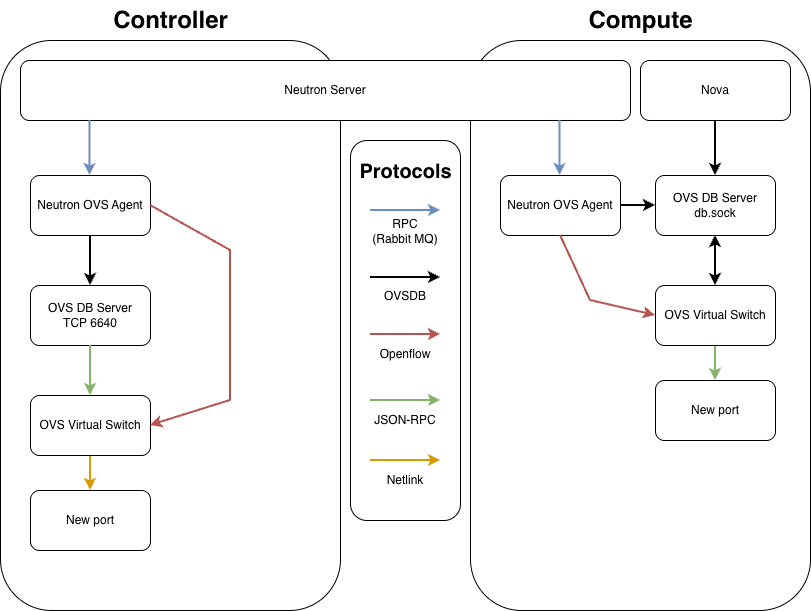
There are 3 types of protocols at play and those are best defined using the standard SDN layer model.
| Plane | Defintion | Protocols | Utilized by |
|---|---|---|---|
| Management | The Blueprint: Configuration, lifecycle, and inventory CRUD operations | RPC / RabbitMQ OVSDB | Neutron Server Neutron OVS Agent OVSDB Server |
| Control | The Logic: The Intelligence orchestrating forwarding rules and path selection. | Openflow | Neutron OVS Agent |
| Data | The Execution: The actual movement of bits and bytes across the wire. | VXLAN Netlink | OVS Virtual Switch |
The Flow on the Controller
The Controller acts as the orchestrator. It manages the global network state and handles centralized services (like Routing or DHCP).
- Orchestration (API): The Neutron Server receives a request to modify the network.
- Messaging (RPC): Neutron Server sends an RPC message via RabbitMQ to the Neutron OVS Agent on the Controller.
- Management Plane (OVSDB): The Neutron OVS Agent connects to the OVS DB Server via TCP 6640 and requests a port/bridge change.
- Internal Notification (JSON-RPC): The OVS DB Server updates the database and pushes an update notification to
ovs-vswitchdvia their internal monitoring socket. - Control Plane (OpenFlow): The Neutron OVS Agent sends instructions via OpenFlow (TCP 6633) to
ovs-vswitchdto define forwarding rules. - Implementation (Netlink):
ovs-vswitchduses Netlink system calls to program the Kernel Datapath.
The Flow on the Compute Node
The Compute node acts as the Worker. It handles the actual virtual machines and implements the logic sent down from the Controller.
- Messaging (RPC): The Neutron OVS Agent on the Compute node receives the RPC message from the Neutron Server (via RabbitMQ) containing the networking policy for a VM.
- Management Plane – Step A (Nova): Nova-Compute connects to the OVS DB Server via
db.sockto physically “plug” the VM’s virtual interface (TAP device) into the bridge. - Management Plane – Step B (Agent): The Neutron OVS Agent also connects to the OVS DB Server via
db.sockto “claim” that port, assigning it a local VLAN tag and configuring metadata. - Internal Config: The OVS DB Server synchronizes these changes with the OVS Virtual Switch.
- Control Plane (OpenFlow): The Neutron OVS Agent sends the “Forwarding Logic” (e.g., Security Group rules, VXLAN mapping) to the OVS Virtual Switch via OpenFlow (TCP 6633).
- Implementation (Netlink): The OVS Virtual Switch pushes these rules into the Kernel Datapath via Netlink.
The Neutron Server provides centralized orchestration by managing the global network state. It communicates high-level configuration changes to the distributed nodes via RPC over RabbitMQ, ensuring that local agents are synchronized with the overall cloud topology.
Nova manages the lifecycle of virtual instances and performs the initial attachment of virtual interfaces to the Open vSwitch integration bridge. It executes this by sending configuration requests to the OVS DB Server via the local db.sock interface.
The Neutron OVS Agent serves two functions as the local coordinator for the node. It manages the Management Plane by modifying the OVSDB schema for port parameters (such as VLAN tags) and simultaneously manages the Control Plane by pushing specific forwarding logic to the switch using the OpenFlow protocol.
The OVS DB Server hosts the configuration database for the entire OVS instance. In the ovs-vsctl show output, this corresponds to the “Manager” entry.
- Scope: The Manager applies to the entire OVS switch (the root of the configuration tree). It controls global settings like SSL certificates, external IDs, and the existence of bridges and ports.
- Connectivity: This can be configured multiple ways which is important to note when it comes to the configuration. On the Controller, it is set to ptcp:6640 to allow network-based configuration. On Compute, it uses punix:db.sock for fast, localized, secure access by Nova and the Neutron OVS Agent.
OVS Virtual Switch (ovs-vswitchd)is the daemon that implements the switching logic. It maintains a persistent internal JSON-RPC connection to the OVS DB Server to monitor the configuration state. It consumes OpenFlow rules and manages the kernel-level flow tables. In the ovs-vsctl show output, this process is responsible for maintaining the state of the bridges and ports listed below the Manager level.
The OpenFlow Controller defines the logical behavior of the network traffic. In the ovs-vsctl show output, this corresponds to the “Controller” entry listed under each specific bridge (e.g., br-int or br-ex).
Neutron is the Openstack networking function which was the most challenging to get configured properly. It wasn’t an issue of getting all the services to start, it was getting everything to interact as designed once running. The error that caused me the most trouble was running a command as root instead of the neutron user.
Configuring OVS
OVS is its own project which Openstack utilizes. It’s worth noting OVS is the industry standard and recommended in Bobcat Openstack, OVN is becoming new standard for recent Openstack verstions. OVN is built on top of / still utilizes OVS, but replaces some of the neutron agent and rpc overhead that exists in the OVS only setup making it more scalable. OVS is a good solution for a lab project like this, and provides a foundational understanding of OVS which comes in to play with OVN setups.
As much as i started this project to set up my own cloud, I am compulsively compelled to understand how and why things work rather than focusing solely on the end result. After hours of research, sifting through conflicting information, and creating a layer 2 broadcast storm which took my LAN down (facepalm) I found the answers I was looking for. I will cover where manual OVS configuration ends and the automatic “magic” of the Neutron OVS agent takes over. But before we get into the nitty-gritty of configuration, let’s take a quick look at some key components. Getting to know these will make it easier to understand how OVS and Neutron play together.
- neutron-openvswitch-agent
- Orchestration for Neutron / OVS network operations
- Attaching VMs to the network
- Creating required VXLAN tunnel(s)
- Openflow rules for traffic
- Orchestrates 3 bridge interfaces and required ports
- Integration bridge
- Tunnel bridge
- External bridge
- Orchestration for Neutron / OVS network operations
- OVS System
- Layer 2 virtual switch
- Some Manual configuration required
- Mostly using
ovs-vsctlcommands
- Mostly using
- Bridge interfaces are created here
| Component | Map | Purpose | Configuration Method |
|---|---|---|---|
| br-int | Internal OVS bridge | Links all OpenStack tenant ports and tunnel endpoints | Manual |
| br-ex | Maps to physical provider NIC | Connectivity to the physical host interface bridging to your LAN/VLAN. | Manual |
| br-tun | Virtual bridge | Used in the VXLAN tunnels | neutron-ovs-agent |
| eth0 | Physical management network NIC | This will not be part of the OVS config but is required to stand up the VXLAN tunnels. | Manual |
| eth1 | Physical provider network NIC interface attached to br-ex | Attached to br-ex to provide external-to-openstack connectivity for VMs | Manual |
| VXLAN | Tunnel protocol connecting the controller and compute nodes | Encapsulates VM traffic between the compute and controller nodes. Built over the management network IP. | neutron-ovs-agent |
| VM / VXLAN Ports | Ports dynamically added to VM’s mapped to br-int when the VM starts | Provides network connectivity to VM instances. | neutron-ovs-agent |
| Patch Ports | Connection paths between OVS bridges | Provides connectivity between bridges and enables VXLAN | neutron-ovs-agent |
| Flow Rules | Map to local OVS ports | Programming the OVS flow rules to enforce network segmentation, routing, security groups, etc. | neutron-ovs-agent |
My first inclination was to use the NetworkManager OVS plugin to configure the OVS system and keep the configuration persistent. That created some difficulty and conflicts between NetworkManager and neutron-openvswitch-agent because they are both trying to manage the OVS system. OVS is persistent without network manager and all that is required is a minimum OVS configuration to meet the requirements of neutron-openvswitch-agent. This needs to be configured on the controller and compute nodes. Note it is not recommended to have a provider network on the compute node unless there is a specific purpose because it can create routing inefficiencies. VM traffic will be routed over the VXLAN and out the br-ex interface on the control node.
Create br-int
Control and compute node(s)
The --may-exist flag is not required for a fresh setup
ovs-vsctl --may-exist add-br br-intCreate br-ex
Typically control node(s) only
Using ip commands manually will create a working config but do not persist across reboot. I would normally script IP commands, however, using the /etc/NetworkManager/dispatcher.d/ scripts here will not work because br-ex comes up in the OVS system and is not recognized by NetworkManager.
ovs-vsctl --may-exist add-br br-ex
ovs-vsctl --may-exist add-port br-ex [eth1]
Persistence for br-ex IP assignment
A static ip within the provider network subnet needs to be assigned to the br-ex bridge. ip commands can create a working config but do not persist across reboot. I would normally script IP commands, however, using the /etc/NetworkManager/dispatcher.d/ scripts will not work because br-ex comes up in the OVS system and is not recognized by NetworkManager. So, we need another soluiton. Creating a systemd unit is the cleanest way.
Create the unit file
# /etc/systemd/system/ovs-br-ex-ip.service

[Unit]
Description=Assign IP to OVS br-ex
After=openvswitch.service
Requires=openvswitch.service
Before=neutron-openvswitch-agent.service

[Service]
Type=oneshot
RemainAfterExit=yes
ExecStart=/usr/sbin/ip link set br-ex up
ExecStart=/usr/sbin/ip addr add [CIDR IP] dev br-ex

[Install]
WantedBy=multi-user.target
Enable the service unit
This will need a reboot to take effect but the ip commands above can be run manually for immediate configuration
systemctl daemon-reload
systemctl enable ovs-br-ex-ip.service
Visual representation for minimal OVS setup
Bridge br-ex - [ip_address]
    Port [for_eth1]
        Interface [eth1]
Bridge br-int
Setting up the Config Files
The configuration for OVS turned out to be pretty simple, where it got complex, and where a lot of my errors came from, were in the config files. The default config files are huge but everything is commented out. Essentially the package maintainers make no assumptions and provide well commented but enormous files. This is where I ran into seemingly conflicting information. There are multiple ways to configure the services and one approach wasn’t necessarily wrong, but the pieces didn’t match so things didn’t work together.
The Openstack documentation gives a recommended configuration for all the services, but what it doesn’t account for is default behavior for things not explicitly set in the files. A few things can affect default behaviors, one of which is changes in the linux distribution. The other piece of this is fallback behavior, the Openstack default may be what is implicitly intended but in the absence of a functional dependency, that default behavior can change to something incompatible with the rest of the service configurations. With that many moving pieces the ripple effects can make it difficult to determine if the current error is reflective of a symptom or the root cause.
The files I modified for a sucessful configuration are as follows:
/etc/neutron/plugins/ml2/ml2_conf.ini(controller)/etc/neutron/plugins/openvswitch-agent.ini(controller & compute)/etc/nova/nova.conf(compute)
Controller
/etc/neutron/plugins/ml2/ml2_conf.ini
[DEFAULT]
[ml2]
type_drivers = flat,vlan,vxlan
# blank value in documentation
tenant_network_types = vxlan
mechanism_drivers = openvswitch
extension_drivers = port_security
[ml2_type_flat]
flat_networks = provider
[ml2_type_geneve]
[ml2_type_gre]
[ml2_type_vlan]
# not included in documentation
network_vlan_ranges = provider:100:200
[ml2_type_vxlan]
# not included in documentation
vni_ranges = 1:1000
[ovs_driver]
[securitygroup]
[sriov_driver]
/etc/neutron/plugins/openvswitch-agent.ini
[DEFAULT]
# optional but critical for troubleshooting
debug = true
[agent]
tunnel_types = vxlan
# value is true in documentation
l2_population = false
[dhcp]
[metadata]
[network_log]
[ovs]
# not included in documentation
integration_bridge = br-int
# not included in documentation
tunnel_bridge = br-tun
# provider value is defined and must match ml2_conf.ini
bridge_mappings = provider:br-ex
local_ip = [management ip]
# not included in documentation
enable_openflow = true
# not included in documentation
of_interface = native
[securitygroup]
enable_security_group = true
firewall_driver = openvswitch
Compute
/etc/neutron/plugins/openvswitch-agent.ini
[DEFAULT]
[agent]
tunnel_types = vxlan
# value is true in documentation
l2_population = false
[dhcp]
[metadata]
[network_log]
[ovs]
# not included in documentation
integration_bridge = br-int
# not included in documentation
tunnel_bridge = br-tun
local_ip = [management ip]
# not included in documentation
ovsdb_connection = unix:/var/run/openvswitch/db.sock
# not included in documentation
enable_openflow = true
# not included in documentation
of_interface = native
[securitygroup]
enable_security_group = true
firewall_driver = openvswitch/etc/nova/nova.conf
modified sections only shown due to file size
[os_vif_ovs]
# not included in documentation
ovsdb_connection = unix:/var/run/openvswitch/db.sock
[libvirt]
# VM must support kvm / hardware passthrough for the following
virt_type = kvm
# not included in documentation
cpu_mode = host-passthrough
# not included in documentation
video_image_meta_model = vga
# not included in documentation
pointer_model = tablet
# not included in documentation
hw_machine_type = x86_64=q35l2_populationfalsevalue means the VXLAN will be built regardless.- Notice the
ovsdb_connectionis unset on the controller, which defaluts to using TCP, while the compute instance uses a localdb.sockfile. This sets the way that protocols talk to the OVS manager. Since OVS runs local to the instance the compute and controller do not need to use the same setting. However, thenova.conffile &openvswitch-agent.ini integration_bridge&tunnel_bridgeexplicitly set the interface name to be used instead of relying on defaultsenable_openflowandof_interfaceare also explicitly set eliminating incompatible defaults.- The
libvirtsettings ensure higher performance for kvm emulation. Options must be supported by VM & hardware.
Caveats and Workarounds
Configuration wasn’t the only hurdle I had to clear. There are a few things that I ran into that needed other modifications for one reason or another. I’ve included these in this section.
DNS SELinux override for control node
Due to stricter policy updates in CentOS9 an SELinux rule needs to be made so that neuton’s DHCP agent can function properly. If you see a dnsmasq error in the neutron logs you can run this to find it int he SELinux logs and create an exception
# 1. Search the audit logs for recent Neutron-related denials
# -m avc: look for Access Vector Cache (SELinux) denials
# -ts recent: look for events that happened in the last 10 minutes
sudo ausearch -m avc -ts recent | grep neutron

# 2. Generate a human-readable Type Enforcement (.te) file from those errors
sudo ausearch -m avc -ts recent | audit2allow -M neutron_socket_fix

# 3. Review what the tool found (optional but recommended)
cat neutron_socket_fix.te

# 4. Install the generated policy package (.pp) into the kernel
sudo semodule -i neutron_socket_fix.pp
Neutron user OVS access
On the compute node the neutron agent needs to be able to access OVS, but again due to updates this is blocked by default. This was blocked in a couple ways by both by permissions and by SELinux. The OVS lock file is assigned to group hugetlbfs which the neutron user needs to be added to. It is also important to make sure the directory shares this group so that the neutron user an get to the lock file. To do this create an override for the systemd service. This file and directory will need to be created.
Add neutron user to hugetlbfs
usermod -aG hugetlbfs neutronCreate override setting for directory permissions and ownership
# /etc/systemd/system/openvswitch.service.d/override.conf
[Service]
ExecStartPre=/usr/bin/mkdir -p /var/run/openvswitch
ExecStartPre=/usr/bin/chown -R openvswitch:hugetlbfs /var/run/openvswitch
ExecStartPre=/usr/bin/chmod 775 /var/run/openvswitch
Correct lock file permissions
By default the lock file does not have write permissions for the hugetlbfs group which are required. This was a tricky one to solve for because the lock file permissions are hard coded when the service unit starts, but the lock file does not exist until the service starts. To address this, I needed to create an override for the unit directly vs setting override variables. This override file will effectively add a line to the service unit that changes lock file permissions after the service command has been executed and the lock file has been created.
mkdir -p /etc/systemd/system/ovsdb-server.service.d/override.conf
cat > /etc/systemd/system/ovsdb-server.service.d/override.conf <<EOF
[Service]
ExecStartPost=/bin/chmod 0660 /var/run/openvswitch/db.sock
EOF
Add SELinux Rule
SELinux blocks the neutron user from writing to the lock file because typically no user other than openvswitch would need to write to the lock file. So although neutron now has permissions, we need to tell SELinux that it’s ok.
# create file
cat > "neutron_ovs_proactive.te" <<EOF
module neutron_ovs_proactive 1.0;

require {
    type neutron_t;
    type openvswitch_var_run_t;
    class sock_file write;
    class unix_stream_socket connectto;
}

allow neutron_t openvswitch_var_run_t:sock_file write;
allow neutron_t openvswitch_var_run_t:unix_stream_socket connectto;
EOF

# Compile and install the source file above
checkmodule -M -m -o neutron_ovs_proactive.mod neutron_ovs_proactive.te
semodule_package -o neutron_ovs_proactive.pp -m neutron_ovs_proactive.mod
sudo semodule -i neutron_ovs_proactive.pp
Running db population as neutron
This is a syntactical error I want to call out because it totally broke Neutron. Omitting the su -s caused the command to be run as root vs neutron, which put the privsep process in a crash/ restart loop dueo to priviledge errors.
# Incorrect
/bin/sh -c "neutron-db-manage --config-file /etc/neutron/neutron.conf --config-file /etc/neutron/plugins/ml2/ml2_conf.ini upgrade head" neutron

# Correct
su -s /bin/sh -c "neutron-db-manage --config-file /etc/neutron/neutron.conf --config-file /etc/neutron/plugins/ml2/ml2_conf.ini upgrade head" neutron
Neutron Metadata Agent
The neutron metadata agent interacts with cloud-init which is how cloud images ‘auto’ configure themselves. For example when you add a public key to an instance before starting, cloud-init interacts with the metadata agent to make that happen. For this to work the metadata agent needs to talk to nova and vise versa so there are a couple blocks I needed to add to make that work. The minimal config in the documentation is designed for a minimal config assuming some default behavior, although I am not sure how this would work at default because in my case metadata agent needed the neutron section added to communicate.
# /etc/neutron/metadata_agent.ini
[DEFAULT]
nova_metadata_host = controller
metadata_proxy_shared_secret = [ METADATA_PASSWORD ]
[nova]
auth_url = http://controller:5000
auth_type = password
project_domain_name = Default
user_domain_name = Default
region_name = RegionOne
project_name = service
username = neutron
password = [ NEUTRON_PASSWORD ]
[agent]
[cache]
This will match the neutron section in the nova .conf file which is shown in the documentation
# /etc/nova/nova.conf
...
[neutron]
# ...
auth_url = http://controller:5000
auth_type = password
project_domain_name = Default
user_domain_name = Default
region_name = RegionOne
project_name = service
username = neutron
password = [ NEUTRON_PASSWORD ]
service_metadata_proxy = true
metadata_proxy_shared_secret = [ METADATA_PASSWORD ]

...
Console Config (for Horizon access)
The documentation is a little unclear on the IPs, it simply says $my_ip but this can vary depending on the desired behavior. 0.0.0.0 is ‘anywhere’ so I use this because I may not always use this from the same IP address. server_listen is where the web ‘no vnc’ (the name of the server used for console access) server will take requests from. server_proxyclient_address could technically be a domain name but if this is only in /etc/hosts then it has to be there on all the systems involved. So, it’s best to use IPs unless this is in a dns record. novncproxy settings may not be necessary but it keeps openstack from guessing so it can prevent errors as defaults change.
# /etc/nova/nova.conf
# controller
...

[vnc]
enabled = true
server_listen = 0.0.0.0
server_proxyclient_address = [ CONTROLLER_IP ]
novncproxy_host = 0.0.0.0
novncproxy_port = 6080

...
The source of the console data (the vm) is on the compute node but the web server that the console points to is on the control node. That is why both destinations are used on the compute node. The documentation shows ‘contoller’ vs the IP, use IPs to avoid DNS resolution issues.
# /etc/nova/nova.conf
# compute node
...

[vnc]
enabled = true
server_listen = 0.0.0.0
server_proxyclient_address = [ COMPUTE_IP ]
novncproxy_base_url = http://[ CONTROLLER_IP ]:6080/vnc_auto.html

...
The Issue: Your [lvm] section is inheriting some “None” or “Default” values that are overriding the [DEFAULT] or [backend_defaults] settings. In OpenStack Cinder, if the driver thinks the target_helper is tgtadm (the old default) but you are trying to use lio (the new standard), it gets paralyzed. It won’t open port 3260 because it’s looking for the wrong software.
[lvm] volume_driver = cinder.volume.drivers.lvm.LVMVolumeDriver volume_group = cinder-volumes target_protocol = iscsi target_helper = lioadm # Add these explicitly to the [lvm] section to stop the ‘None’ overrides: target_ip_address = 172.22.3.23 target_port = 3260
Race condition for memcached
Upon boot, memcached may fail due to the network not being fully up and thus cannot bind to an ip address. Rather than letting this be a race we can set memcached to required network to be up before it tries to start. The systemd unit can be updated to wait for the network to come up.
# Add a drop-in override to wait for the network
sudo mkdir -p /etc/systemd/system/memcached.service.d/
echo -e "[Unit]\nAfter=network-online.target\nWants=network-online.target" | sudo tee /etc/systemd/system/memcached.service.d/wait-for-network.conf
sudo systemctl daemon-reload
CentOS9 OpenStack (COS) Node Setup
I am always think about scale and repeatability, even in my lab projects. So, while I was setting this up I created a setup script. That script became pretty extensive with the ability to customize variables and openstack version. While I installed bobcat, the newer versions of Openstack use RBAC (which I plan to cover in a future post) starting with Dalmatian, which significantly changes the way user and admin permissions work. The script defaults to RBAC and implements the things in this post.
The intent of the script to provide a way to quickly install working Openstack nodes and services which follow the manual installation process. This should quickly produce working nodes but should be considered a work in progress. As I learn more this is being updated so if you like a version you may want to fork it. This should provide a ‘running start’ to getting a manual setup installed. You can check it out on GitHub.
Leave a Reply